Add it to MetaMask
When a site asks MetaMask to sign a Hyperliquid request, this Snap adds a short panel to the request. An API wallet approval names the key that gets trading access and when that ends. A send or a withdrawal names where the funds would go.
Looking for MetaMask…
MetaMask shows what the Snap may do and asks you to confirm. It runs in the MetaMask browser extension and installs from npm as @hyperodds/snap, version 0.1.0.
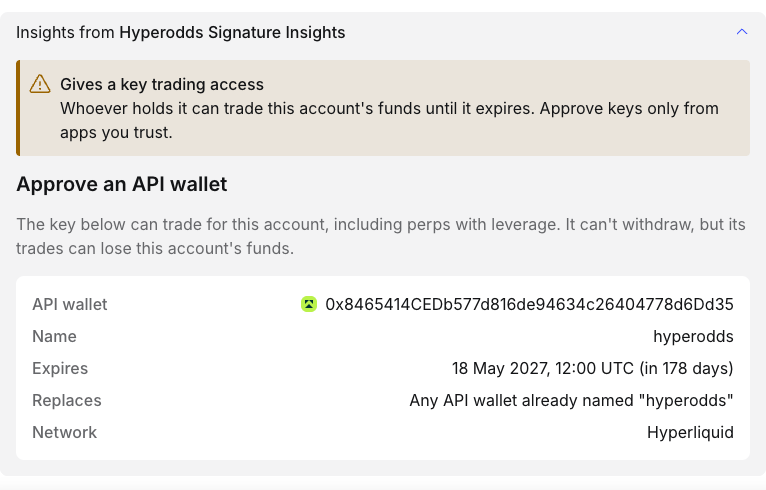
An API wallet approval from the Hyperodds Console, in MetaMask. MetaMask lists the raw fields. The panel says what they mean.
What the panel shows
| Request | The panel shows |
|---|---|
| API wallet approval | The key that gets trading access, its name, when it expires and which API wallet it replaces. |
| Builder fee approval | The builder and the most it can charge per order. |
| Sends and withdrawals | Where the funds would go, the amount and the token, and which balances they move between. |
| Staking links and multi-sig changes | The other account or every signer, and what they could do with this account afterwards. |
| Orders and cancels | The hash being signed. Hyperliquid signs these as a hash, and the panel says it can't show the details. |
| Requests it doesn't know yet | Every signed field, as written. |
Each panel carries a risk level: Low, Check or High. A request that moves funds out of the account is High. The Snap never blocks a request, so the decision stays with you.
What the Snap can see
Every request is decoded inside MetaMask. The Snap has no network access and stores nothing.
MetaMask asks you to allow two things: showing a panel on signature requests, and seeing which site sent each one. The site matters for one check. An API wallet named after Hyperodds is flagged unless the request comes from usehyperodds.com.
Requests from other apps and other chains get no panel.
Remove it
In MetaMask, open the menu, choose Snaps, then Hyperodds Signature Insights, and choose Remove. Signature requests then show as they did before.
Hyperliquid and MetaMask are named to describe compatibility. Hyperodds is not affiliated with either.