What it shows
When a Polymarket or Kalshi market page has a matching market on Hyperliquid's HIP-4, the extension adds one line in the corner of the page: what the matching side costs to buy on HIP-4, and the Hyperodds fair line where there is one.
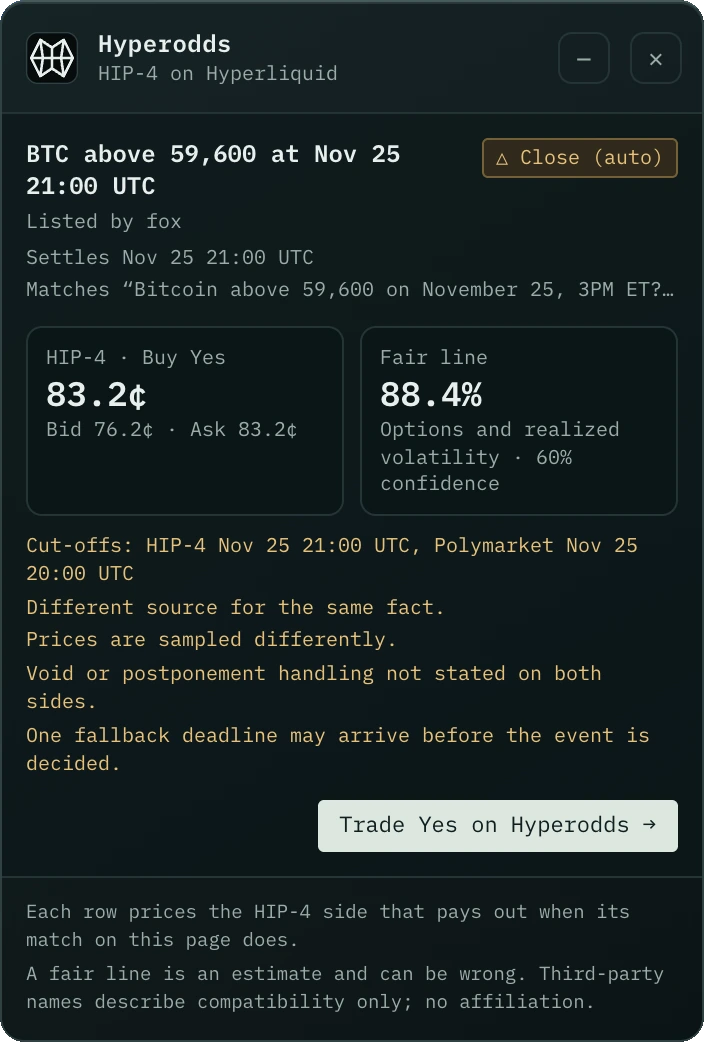
Open the line to see every match on the page. Each one is graded on how closely the two markets' written rules agree. Same means no difference was found. Close names the term that differs, such as the cut-off time or how a postponement is handled. A pair whose rules pay on different things is never shown.
Trade opens the market on Hyperodds with an order ticket for the matching side, and you sign every order yourself. Prices refresh every 30 seconds while the tab is in view. A page without a match shows nothing.
Install it
The extension installs from this page in Chrome, Brave and Edge, version 120 or later.
DOWNLOAD FOR CHROME, BRAVE AND EDGE
- Download the package and unzip it. Keep the folder: the browser runs the extension from it.
- Open your browser's extensions page. Its address is chrome://extensions, brave://extensions or edge://extensions.
- Turn on Developer mode.
- Choose Load unpacked and pick the unzipped folder, the one that holds manifest.json.
- Open a market on Polymarket or Kalshi.
Installed this way, the extension does not update itself. This page always lists the current version. To update, replace the folder's contents with the new package and choose Reload on the extensions page.
| Version | 0.1.0 |
|---|---|
| File | hyperodds-extension-chrome-0.1.0.zip, 165 KB |
| SHA-256 | 1cd51ad29b117c3aa281466acabb573eed93afa80813ce53be77a1e129e15994 |
Firefox
Firefox installs only add-ons that Mozilla has signed, so there is no Firefox download here yet.
What it reads and sends
The extension runs on polymarket.com and kalshi.com only, and reads one thing there: the page's address.
On a market page it sends the slug or ticker in that address to api.usehyperodds.com, which answers with the matching HIP-4 markets. The request carries your IP address, used for the rate limit and not stored, and the browser's standard headers, such as its user agent and language. No cookies, wallet address or identifier go with it.
It asks for no other permission, loads no code from the network and stores nothing in your browser.
READ THE PRIVACY NOTICEGood to know
The line shows only on pages Hyperodds has matched. Today that is mostly sports, season winners, rate decisions and crypto price levels.
Every grade is automatic until a person has checked it, and the panel marks those as auto.
A fair line shows only when more than one source sets it with at least 50% confidence, and never when the page's own market is its only source. Many pages show the HIP-4 price alone, and the panel says why.
A Close pair can settle up to 24 hours apart. The panel shows both cut-offs, and a wide HIP-4 book shows as a wide book, without a price.
Polymarket and Kalshi are named for compatibility only. Hyperodds is not affiliated with either.
For developers
The extension makes one request, to a public endpoint that anyone can call with a Polymarket slug or a Kalshi ticker.
curl -G 'https://api.usehyperodds.com/trpc/markets.venuePage' \
  --data-urlencode 'input={"venue":"kx","ticker":"KXFEDDECISION"}'
The package is not minified. Its source, with the one command that rebuilds the same files, is a separate download.
| Source | hyperodds-extension-source-0.1.0.zip, 192 KB |
|---|---|
| SHA-256 | 131e3b54132ee9a3c1de94134b24800d0cdc94b063c1aec710389f5eec9c32aa |